
 by
Christian Fischer
by
Christian Fischer

Until recently, creating visuals that reflect your brand style meant juggling multiple tools, endless downloads, and plenty of time lost between searching and designing. But what if you could move from inspiration to finished graphic in one place without leaving your browser?
Shutterstock Editor is designed precisely for that. It combines Shutterstock’s vast image library and a built-in design workspace, so you can find, customize, and export visuals that look perfectly polished, all in minutes.
This smart browser-based editor is quietly becoming a go-to tool for marketers, content creators, and small businesses looking to stay fast, consistent, and creative.

Exclusive: 15% off all standard subscriptions and packages from Shutterstock!
Get 15% off all standard subscriptions and packages from Shutterstock now!
Instead of switching between different apps, Shutterstock Editor keeps your creative process centralized.
From your Shutterstock account, you can open any photo, vector, or template directly in the Editor, adjust it to your needs, and download your final design in the right format—no third-party software required.
It’s especially useful for:
The goal is simple: fewer steps, more creativity, and zero friction between idea and execution.
Below is a quick overview of what you’ll find inside Shutterstock Editor and how each feature helps you work faster while maintaining professional quality.
| Feature | What It Does | Why It Matters |
|---|---|---|
| Editable Templates | Ready-made designs for social posts, banners, and more | Jumpstart projects without starting from scratch |
| Smart Resize | Instantly adapts layouts for different platforms | Perfect for multi-channel campaigns |
| Brand Kit | Save and reuse logos, fonts, and colors | Keep visuals consistent with your brand |
| AI Background Remover | Deletes backgrounds with one click | Makes compositing effortless |
| Text and Filters | Add typography, overlays, and effects easily | Bring your message and style together |
| One-Click Export | Download in multiple formats instantly | Speeds up delivery and publication |
Each of these features saves you valuable time, making this tool not just convenient, but strategic for busy creative professionals.
Exclusive: 15% off all standard subscriptions and packages from Shutterstock!
Get 15% off all standard subscriptions and packages from Shutterstock now!
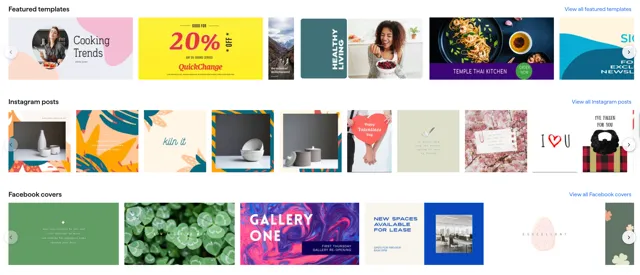
Every brand thrives on visual harmony, but maintaining that across campaigns and platforms is easier said than done. With Shutterstock Editor, brand consistency becomes part of the process, not an afterthought.
By creating and saving branded templates, you ensure that your future visuals automatically follow your chosen typography, colors, and layout guidelines. Whether you or someone else on your team handles design, the results always align with your identity.
And because everything happens in one environment, you avoid the common pitfalls of file transfers, lost assets, and mismatched visuals.
Traditionally, creating a simple marketing image required several tools and steps:
Now, you can skip all of that. Shutterstock Editor connects image discovery and design customization in one continuous flow.
You browse Shutterstock’s library, select an image, and open it inside the Editor with one click. From there, you can resize, add copy, apply effects, and export the result—no switching tabs, no lost time.
This integration is what makes Shutterstock Editor particularly efficient for daily content creation, from blog graphics to paid ads and social visuals.
If you collaborate with others, Shutterstock Editor can fit naturally into a shared creative process. Teams can:
Combined with Shutterstock Teams, it becomes even easier to manage assets, approvals, and downloads under one license, perfect for agencies or marketing departments that simultaneously handle multiple projects.
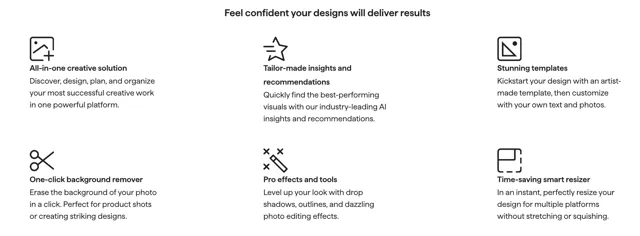
The Editor isn’t a standalone product—it’s one piece of the broader Shutterstock Creative Flow, a suite of tools that help users go from idea to finished content faster.
Within the same ecosystem, you’ll find:
Together, these features position Shutterstock as more than a stock provider: it’s a complete creative hub for modern creators.
What sets Shutterstock Editor apart isn’t just convenience but also how much creative control it gives without the complexity of full design software.
For marketers, small business owners, and designers, it’s an easy win: professional results, faster workflow, and everything in one browser window.
Shutterstock Editor redefines what it means to create on-brand visuals. It blends the flexibility of online design with the power of Shutterstock’s professional asset library, helping you go from idea to execution in record time.
Whether you’re a solo creator or part of a larger team, it’s the ideal companion for keeping your visuals consistent, engaging, and ready for publication, without extra tools or extra time.
Try Shutterstock Editor today and see how simple, fast, and cohesive online design can be.
THE AUTHOR
Christian Fischer
B2B marketing has changed a lot in recent years. Attention spans are shorter, and expectations are higher. Businesses are not only competing with their offers, but also with how clearly they present them. Visual content, especially video, has become more important across channels. Still, not all content delivers the same results. Understanding what tends to work […]
Marketing has evolved into a constant flow of content. Brands are no longer producing visuals occasionally—they are producing them continuously. This shift has transformed how businesses approach imagery. What used to be a simple choice between stock photos and custom photography has become a strategic decision tied to performance, scalability, and speed. Both options have distinct strengths, and […]
By 2026, social media has transformed into a high-stakes visual economy. With attention spans measured in milliseconds, the standard stock photo is no longer enough to keep users engaged. For brands looking to scale, the transition from free assets to a professional library like Shutterstock is often the turning point. But does the investment translate to actual […]